---
title: Markdown Master CMS
description: Flat-file based content management system utilizing simple markdown files
image:
src: media/markdownmaster-static-site-cms.webp
heading:
- widget: 'cover'
title: 'TITLE'
subtitle: 'The least CMS-like CMS you will find. Just flat markdown files, HTML, and CSS... (and a bunch of Javascript).'
cta:
text: 'Download from Github'
href: 'https://github.com/eVAL-Agency/MarkdownMasterCMS/releases/latest'
icon: 'github'
---
## First question, why?
There are so many options for a content management system out there;
Wordpress, Drupal, Joomla, Jekyll, CMS Made Simple, and so many more.
They all share common mechanisms, notably some form of administration dashboard
for managing that content, usually with said content stored in a database.
Others, like Jekyll, skip this, but still require a build step to generate the static
website.
Markdown Master CMS is different in that there is no database; there is no authentication
to get broken; there is no build procedure that content authors are required to know.
* Step 1: Write your content in plain-text markdown.
* Step 2: Upload that simple file to your site.
---
Pair this application along with a sync platform like Syncthing or Nextcloud
and you can even skip the second step, by having the raw files just immediately
on your desktop that automatically get synced to the web server.
This works because there are **zero build steps required** for deploying content
with Markdown Master CMS.
## How Markdown Master CMS works
When a visitor browses to a MarkdownMaster website, the client browser
retrieves the skeleton HTML wrapper which will contain the CSS, fonts, and
the primary CMS javascript handler along with any configuration set by the site author.
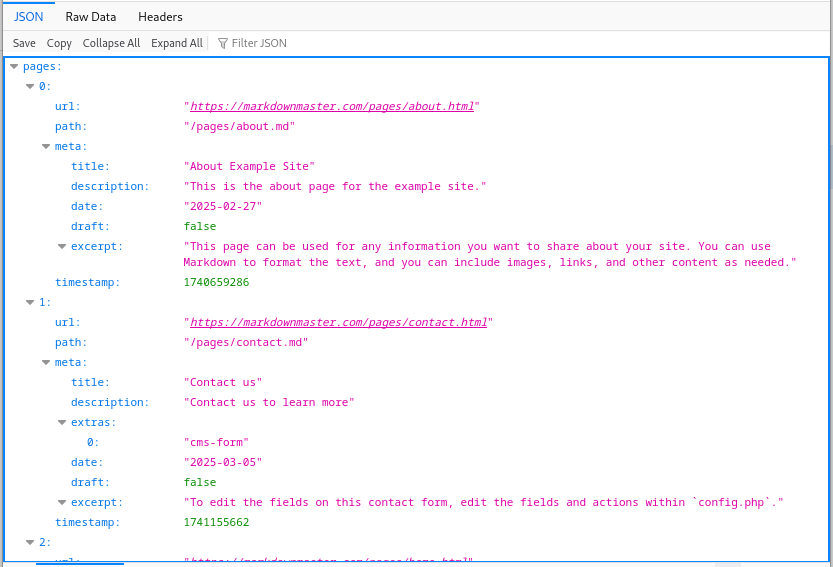
The CMS then makes a request to a backend fetch helper to
[retrieve a listing of all markdown pages and their metadata](https://markdownmaster.com/meta.json).
This cache of files is stored in the browser's memory and is used to render listing snippets.
[](https://markdownmaster.com/meta.json)
The next step is the CMS will match the URL requested to a markdown file in the cache
and retrieve [the markdown source](https://markdownmaster.com/pages/home.md) of the requested page
which will contain the full body text.
This markdown body text is rendered with [Remarkable](https://github.com/jonschlinkert/remarkable){target=_blank}
(with some special modifications), and used to replace the temporary page.
---
Generally speaking, this is excessive and unnecessary, as the server is already capable
of rendering Markdown to HTML.
The beauty of this system comes into play when browsing through the site.
When loading a new page on a Markdown Master site, the browser only has to make a request
for the target markdown file, (if not already in memory), and render a snippet of the body.
Since these requests for a flat file are just that, no server-side processing is required,
allowing for a very fast and efficient browsing experience.
## SEO and bot support
Most crawlers do not parse Javascript however, so any content rendered with JS
are virtually invisible to search engines. For a website which is meant to be indexed
and public, this poses a huge issue.
To circumvent this, the initial request to any `.html` page on the CMS will use a server-side
script to dynamically render the markdown in that file to HTML.
## Why Markdown?
The main technical function of a website is to generate HTML, so it would make sense to use HTML
for the content...
While this is true, it's also true that asking the user to include all the little `` tags
in their content and to ensure that all their markup is properly escaped and closed is a monumental
ask. Even for experienced web authors forgetting to include that closing `
` tag is an easy mistake.
Markdown provides a simple solution for content authors, regardless if they may be developers,
designers, or your clients who have more important things to do other than try to figure out the
minutia of a CMS just to update their weekly specials.
Markdown offers a quick and simple option for documentation authors as well,
where they can quickly make notes in plain text as they work on a project or task,
documenting their work as they go.
These docs can then be uploaded to a Markdown Master website
[via a CI/CD script](https://github.com/eVAL-Agency/MarkdownMasterCMS/blob/main/upload_docs.sh){target=_blank}
automatically on git push of the code
[via a workflow](https://github.com/eVAL-Agency/MarkdownMasterCMS/blob/main/.github/workflows/test.yml){target=_blank}!
Additionally, for those who **do** need the raw power of HTML, Markdown provides support
for including HTML within Markdown files natively!
## Blocks
For example, "blocks" are common in websites, where content will be left/right
adjacent to other content or other media.
While vanilla Markdown cannot provide this functionality...
{.block}
A combination of the improvements done within the Remarkable library in Markdown Master CMS
and embedding HTML snippets within Markdown allow for blocks relatively easily.
{.block}
The default theme in MarkdownMaster has support for block content in variable
widths between 2 and 6 columns.
{.block}
So 3-column blocks are possible, as well as 4, 5, and 6 column blocks.
{.block}
[Checkout some documentation](/docs/authoring-pages.html)
{.block}
```html
some content here in the first block
{.block}
more content in the middle block
{.block}
more content, an image, or a call to action in the third
{.block}
```